8.1. ADC - Key Detection Voltage
This demo mainly introduces the key functions of the ADC. The ADC is used to detect the voltage value of the key input pin and judge whether the corresponding key is pressed according to different voltage divisions.
8.1.1. Hardware Connection
This demo is based on BL706_AVB:
   GPIO function         GPIO pin
----------------------------------
    ADC CH8      <-->     GPIO18
Voltage divider circuit:
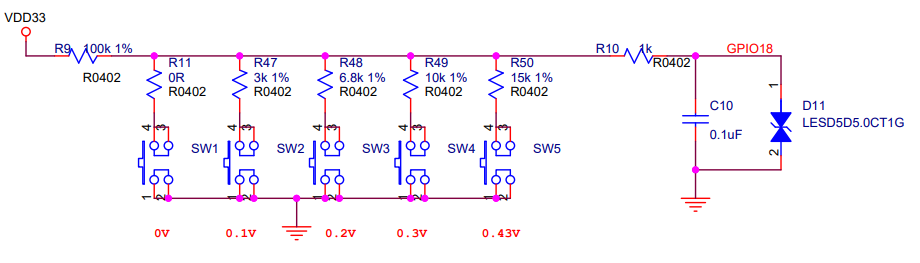
adc key
8.1.2. Software Implementation
For the code see
examples/adc/adc_key
1#define BSP_ADC_CLOCK_SOURCE  ROOT_CLOCK_SOURCE_XCLK
2#define BSP_ADC_CLOCK_DIV  0
Configure the
ADCdevice clock source, seebsp/board/bl706_avb/clock_config.h
1#define CONFIG_GPIO18_FUNC GPIO_FUN_ADC
Configure
ADCdevice multiplexing pins, seebsp/board/bl706_avb/pinmux_config.h
 1#define BSP_USING_ADC0
 2
 3#if defined(BSP_USING_ADC0)
 4#ifndef ADC0_CONFIG
 5#define ADC0_CONFIG \
 6{   \
 7    .clk_div = ADC_CLOCK_DIV_32,\
 8    .vref = ADC_VREF_3P2V,\
 9    .continuous_conv_mode = DISABLE,\
10    .differential_mode = DISABLE,\
11    .data_width = ADC_DATA_WIDTH_16B_WITH_256_AVERAGE,\
12    .fifo_threshold = ADC_FIFO_THRESHOLD_1BYTE,\
13    .gain = ADC_GAIN_1\
14}
15#endif
16#endif
Enable
BSP_USING_ADC0and configure theADCdevice, seebsp/board/bl706_iot/peripheral_config.h
 1adc_channel_cfg_t adc_channel_cfg;
 2adc_channel_cfg.pos_channel = posChList;
 3adc_channel_cfg.neg_channel = negChList;
 4
 5adc_register(ADC0_INDEX, "adc_key", DEVICE_OFLAG_STREAM_RX);
 6
 7adc_key = device_find("adc_key");
 8
 9if(adc_key)
10{
11    ADC_DEV(adc_key)->continuous_conv_mode = ENABLE;
12    device_open(adc_key, DEVICE_OFLAG_STREAM_RX);
13    device_control(adc_key,DEVICE_CTRL_ADC_CHANNEL_CONFIG,&adc_channel_cfg);
14
15}else{
16    MSG("device open failed\r\n");
17}
18
19adc_channel_start(adc_key);
First call the
adc_registerfunction to register theadc_keydevice, which is currently registered as ADC0Then use the
findfunction to find the handle corresponding to the device and save it in theadc_keyhandleThen use
device_opento open theadc_keydevice in polling mode, and calldevice_controlto complete the ADC related configurationFinally call
adc_channel_startto enable ADC conversion
1device_read(adc_key,0,(void *)&result_val,1);
2keyValue = get_adc_key_value(result_val.volt * 1000);
3if( keyValue!=KEY_NO_VALUE){
4
5    MSG("key %d pressed\r\n",keyValue);
6    MSG("result_val.volt: %0.2f mv\n", (result_val.volt * 1000));
7}
Call
device_readto read theadc_keydevice information and save it to theresult_valstructureCall the
get_adc_key_valuefunction to get the current key value and voltage value
8.1.3. Compile and Program
CDK compilation
Open project:adc_key.cdkproj
Refer to the steps of Guide to using CDK (like MDK Keil) under Windows to compile and download
Command compilation
1 $ cd <sdk_path>/bl_mcu_sdk
2 $ make BOARD=bl706_avb APP=adc_key
Program
8.1.4. Experimental Phenomena
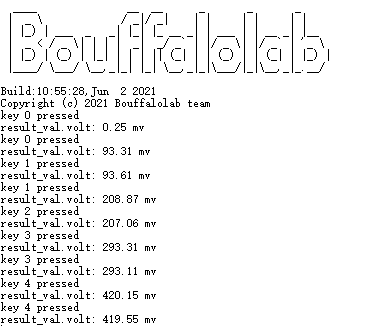
In this experiment, pressing SW1 ~ SW5 on the board in turn will get different voltage values:
key 0: ~0V
key 1: ~0.1V
key 2: ~0.2V
key 3: ~0.3V
key 4: ~0.43V
operation result:
Video display: