5. BLE Client And Server Interconnection
This demo is based on bl702 to demonstrate the connection and data sending and receiving of ble server and ble client.
5.1. Prepare
Two bl702 boards or one bl702 board + mobile app
5.2. Software Implementation
5.2.1. BLE client software Implementation
For the software code, see
examples/ble/ble_central
 1static struct bt_conn_cb ble_tp_conn_callbacks = {
 2 .connected = ble_tp_connected,
 3 .disconnected = ble_tp_disconnected,
 4}
 5
 6void ble_tp_init()
 7{
 8    if( !isRegister )
 9    {
10        isRegister = 1;
11        bt_conn_cb_register(&ble_tp_conn_callbacks);
12    }
13}
In the
bt_conn_cb_registerfunction, register thecallbackfunction for successful connection and disconnectionIn the
ble_start_scanfunction, the device will start scanningIn the
device_foundfunction, the device uploads the scanned Bluetooth device, the code usesadv_nameto find the Bluetooth device that needs to be connected, and initiate the connection
 1static void ble_write_data_task(void *pvParameters)
 2{
 3    int error;
 4    uint8_t buf[20] = {0,1,2,3,4,5,6,7,8,9,10,11,12,13,14,15,16,17,18,19};
 5    while(1)
 6   {
 7        k_sem_take(&write_data_poll_sem, K_FOREVER);
 8        BT_WARN("ble_write_data\r\n");
 9        // Send data to server
10        error =  bt_gatt_write_without_response(ble_tp_conn,char_hdl.tp_wr_hdl,buf,20,0);
11        BT_WARN("Write Complete (err %d)\r\n", error);
12   }
13}
After the connection is successful, in the
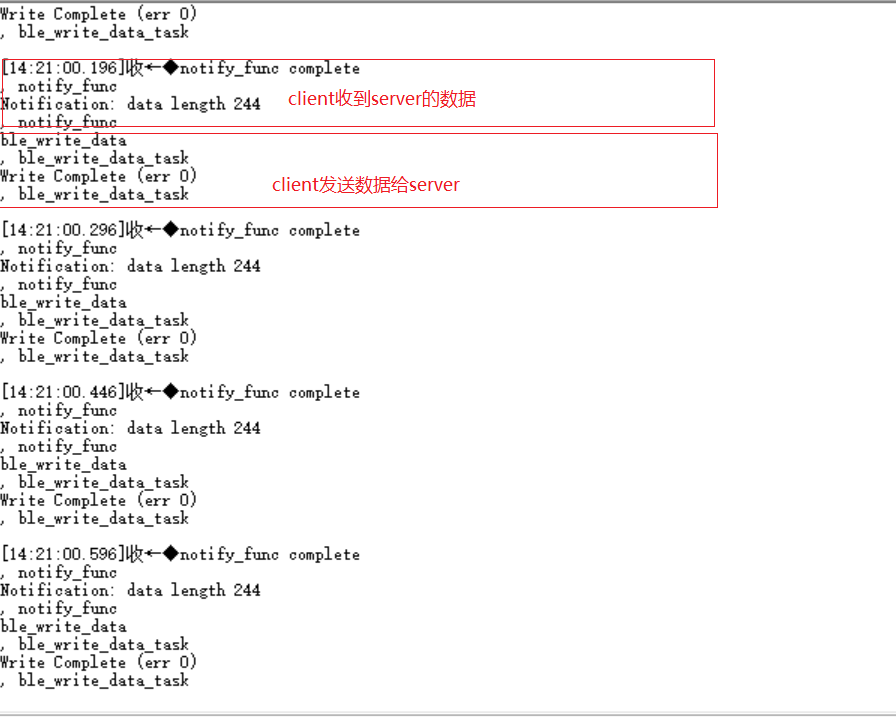
ble_write_data_taskfunction, the client sends the data inbufto the server
1static u8_t notify_func(struct bt_conn *conn,struct bt_gatt_subscribe_params *params,const void *data, u16_t length);
After the connection is successful, in the
notify_funcfunction, the client receives the data from the server,datais the data content,lengthis the data length
5.2.2. BLE server software implementation
See
examples/ble/ble_peripheralfor the software code
 1int ble_start_adv(void)
 2{
 3    struct bt_le_adv_param adv_param = {
 4        //options:3, connectable undirected, adv one time
 5        .options = 3, \
 6        .interval_min = BT_GAP_ADV_FAST_INT_MIN_3, \
 7        .interval_max = BT_GAP_ADV_FAST_INT_MAX_3, \
 8    };
 9
10
11    char *adv_name = "BL_TEST_01"; // This name must be the same as adv_name in ble_central
12    uint8_t data[1] = {(BT_LE_AD_LIMITED | BT_LE_AD_NO_BREDR)};
13    uint8_t data_uuid[2] = {0x12, 0x18};//0x1812
14    uint8_t data_appearance[2] = {0x80, 0x01};//0x0180
15    uint8_t data_manu[4] = {0x71, 0x01, 0x04, 0x13};
16    struct bt_data adv_data[] = {
17            BT_DATA(BT_DATA_FLAGS, data, 1),
18            BT_DATA(BT_DATA_UUID16_ALL, data_uuid, sizeof(data_uuid)),
19            BT_DATA(BT_DATA_GAP_APPEARANCE, data_appearance, sizeof(data_appearance)),
20            BT_DATA(BT_DATA_NAME_COMPLETE, adv_name, strlen(adv_name)),
21            BT_DATA(BT_DATA_MANUFACTURER_DATA, data_manu, sizeof(data_manu))
22        };
23
24
25    return bt_le_adv_start(&adv_param, adv_data, ARRAY_SIZE(adv_data), NULL, 0);
26}
In the
ble_start_advfunction,adv_namesets the name of the broadcast device, and the device starts to broadcast
1static int ble_tp_recv_wr(struct bt_conn *conn, const struct bt_gatt_attr *attr,const void *buf, u16_t len, u16_t offset, u8_t flags);
-After the connection is successful, in ble_tp_recv_wr, the server receives the data from the client, buf is the data content, len is the data length
1static void ble_tp_notify_task(void *pvParameters)
2{
3 int err = -1;
4 char data[244] = {0x01, 0x02, 0x03, 0x04, 0x05, 0x06, 0x07, 0x08, 0x09};
5 k_sem_give(¬ify_poll_sem);
6 while(1)
7 {
8 k_sem_take(¬ify_poll_sem, K_FOREVER);
9 //send data to client
10 err = bt_gatt_notify(ble_tp_conn, get_attr(BT_CHAR_BLE_TP_NOT_ATTR_VAL_INDEX), data, (tx_mtu_size - 3));
11 BT_WARN("ble tp send notify : %d\n", err);
12
13 }
14}
After the connection is successful, in the
ble_tp_notify_taskfunction, the server sends the data indatato the client.
5.3. Compile and program
CDK tool compilation
Not currently supported
Command compilation
1 $ cd <sdk_path>/bl_mcu_sdk
2 $ make BOARD=bl706_iot APP=ble_peripheral SUPPORT_FREERTOS=y SUPPORT_FLOAT=y SUPPORT_BLE=y
1 $ cd <sdk_path>/bl_mcu_sdk
2 $ make BOARD=bl706_iot APP=ble_central SUPPORT_FREERTOS=y SUPPORT_FLOAT=y SUPPORT_BLE=y
Program
5.4. Experimental phenomena
Two bl702 connections

Mobile phone connect bl702
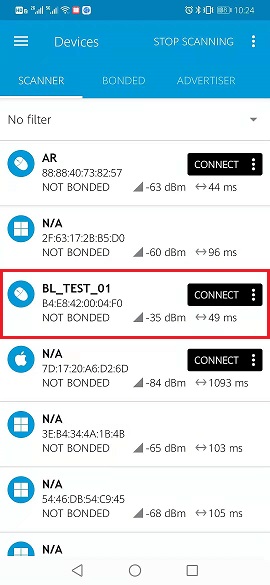
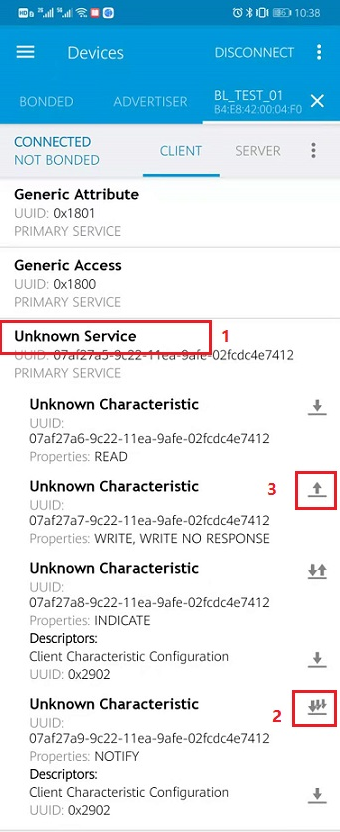
The connection is successful, as shown in the figure below

Steps to send and receive data
Click
1Unknow Serviceto display specific service propertiesClick
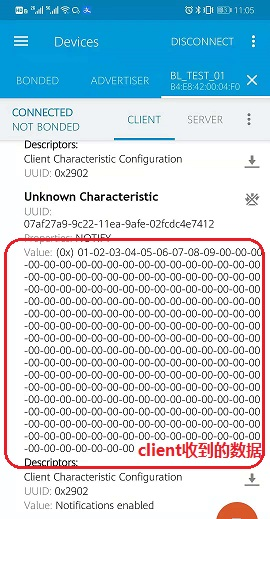
2to turn onNotification, allowing the server to send data to the clientClick
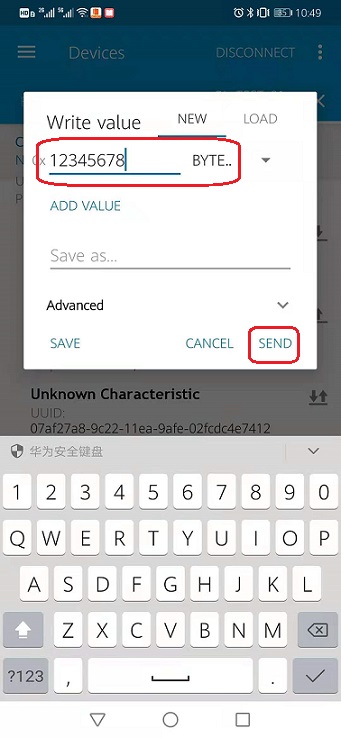
3where the client sends data to the server, fill in the data you want to send, and click theSENDbutton